How to Move From Excel to Odoo Without Disrupting Your Business
At some point, working with Excel becomes your business’s second job, and it becomes more of an office responsibility.
One of the spreadsheets contains customers. Another tracks inventory. The salesperson (or business owner) has the current sales numbers on their computer, and the finance team has different numbers. Then a formula is edited, a row is deleted, or the wrong file is sent, and everyone is using yesterday's facts.
This is typically when companies begin considering Odoo ERP. But the question is not really, “How do we replace Excel?” It's all about, “How do we get things we are already used to and already depending on without taking the business to a halt?”
The positive aspect is that you don't have to change everything at once.
It's not Excel that is the problem. It's what happens when Excel is your system.
Excel works great! For a small team, it can manage budgets, customer lists, stock counts, sales tracking, and so many other typical tasks.
The problem starts to arise when the business grows around the spreadsheets.
A sales representative makes an edit to a customer record. That's what the finance team needs, too. It's still required for inventory. Management desires a report. Employees begin copying and pasting, emailing, and checking files, as opposed to one continuous flow.
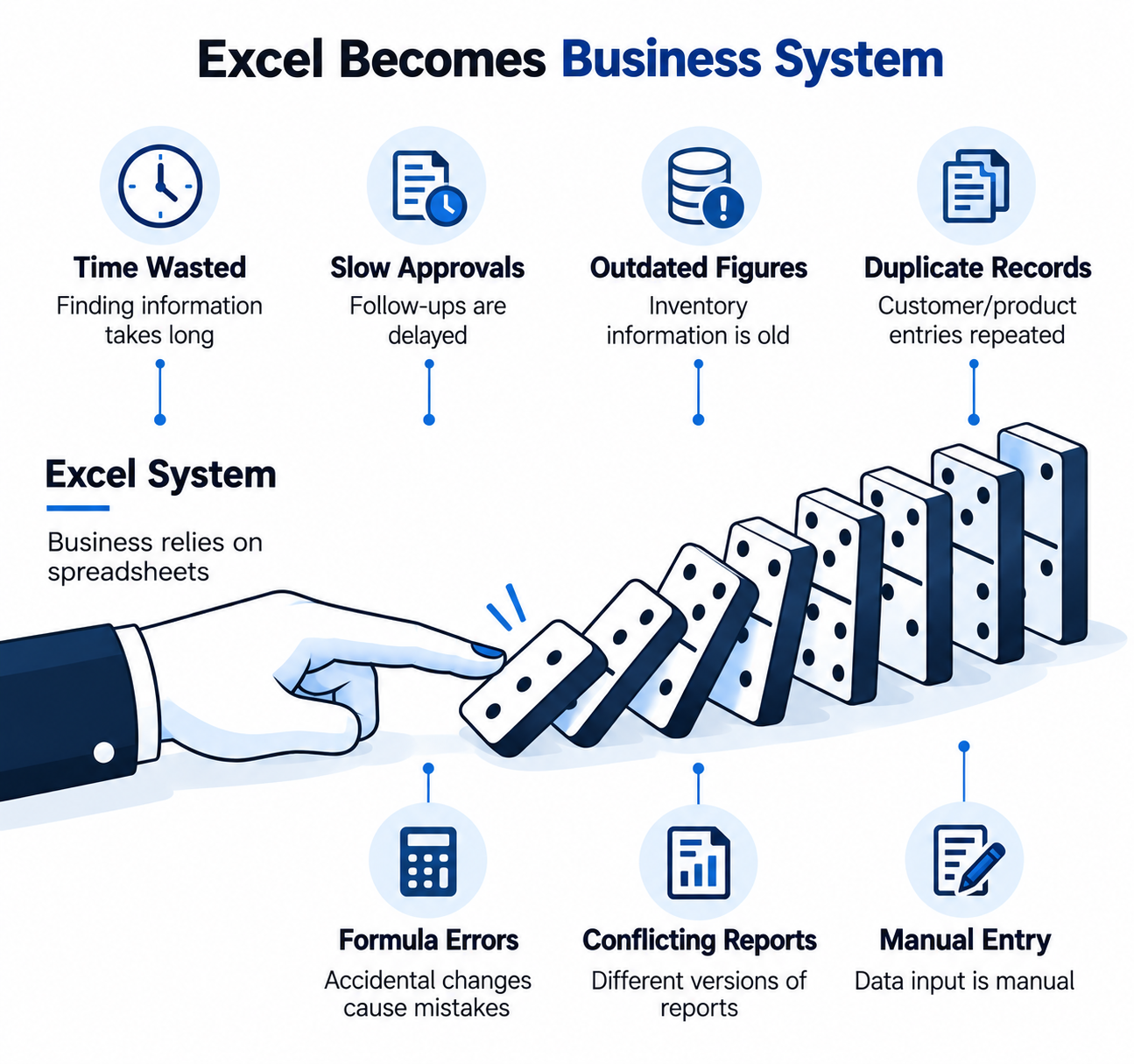
That means the same challenges come up, namely:
- Create multiple copies of customer or product records
- Manual data entry
- Outdated inventory figures
- Differing accounts of the events.
- Slow approvals & follow-ups
- Formulas or accidental changes that cause errors.
- Searching for information for too long.
At some point, the spreadsheet isn't just a record of the business. It's keeping the business afloat.
That's a precarious situation to be in.
What Is Odoo, And Why Would Businesses Choose It?
When you have been researching ERP systems, you may have thought, What's Odoo?
Odoo is an integrated suite of business applications, including CRM, accounting, inventory, sales, manufacturing, project management, and more. Unlike dividing the departments and the functions that run them into separate units, the platform links the departments in one business environment.
That is important if you are leaving Excel behind.
You don't just drag and drop cells between files in another application. You're transforming your business communication.
For instance, if a customer asks a question, it can flow through Odoo CRM, into a quotation, a sales order, and link to various other business processes. Odoo's CRM enables managing leads and opportunities, follow-ups, quotations, pipeline management, and reporting.
The true benefit is that there's not another dashboard to peer at. It's cutting down on the backroom grunt work.
Don't Migrate Your Spreadsheets Blindly
That's where many projects with Odoo can fail.
There are 10 years' worth of customer files, thousands of products, previous sales data, and multiple versions of financial data. This instinct is understandable: “We need all of it in the new system”.
Not necessarily.
Existing data should be reviewed prior to migration.
Some records may be duplicated. Certain products may not even be available anymore. Data about a customer may be misspelled or have missing information. Old spreadsheets may have formulas that were effective at reporting but should never be considered as data that is to be stored in an ERP.
The first step in a proper migration is determining what to move, what to clean up and what to leave behind.
The implementation approach that Octoon proposed with Odoo specifically allows the import of existing customer information, product data, existing sales history, and financial data, rather than starting from scratch.
This could have a huge impact on the transition.
Move In Stages Instead Of Switching Everything At Once
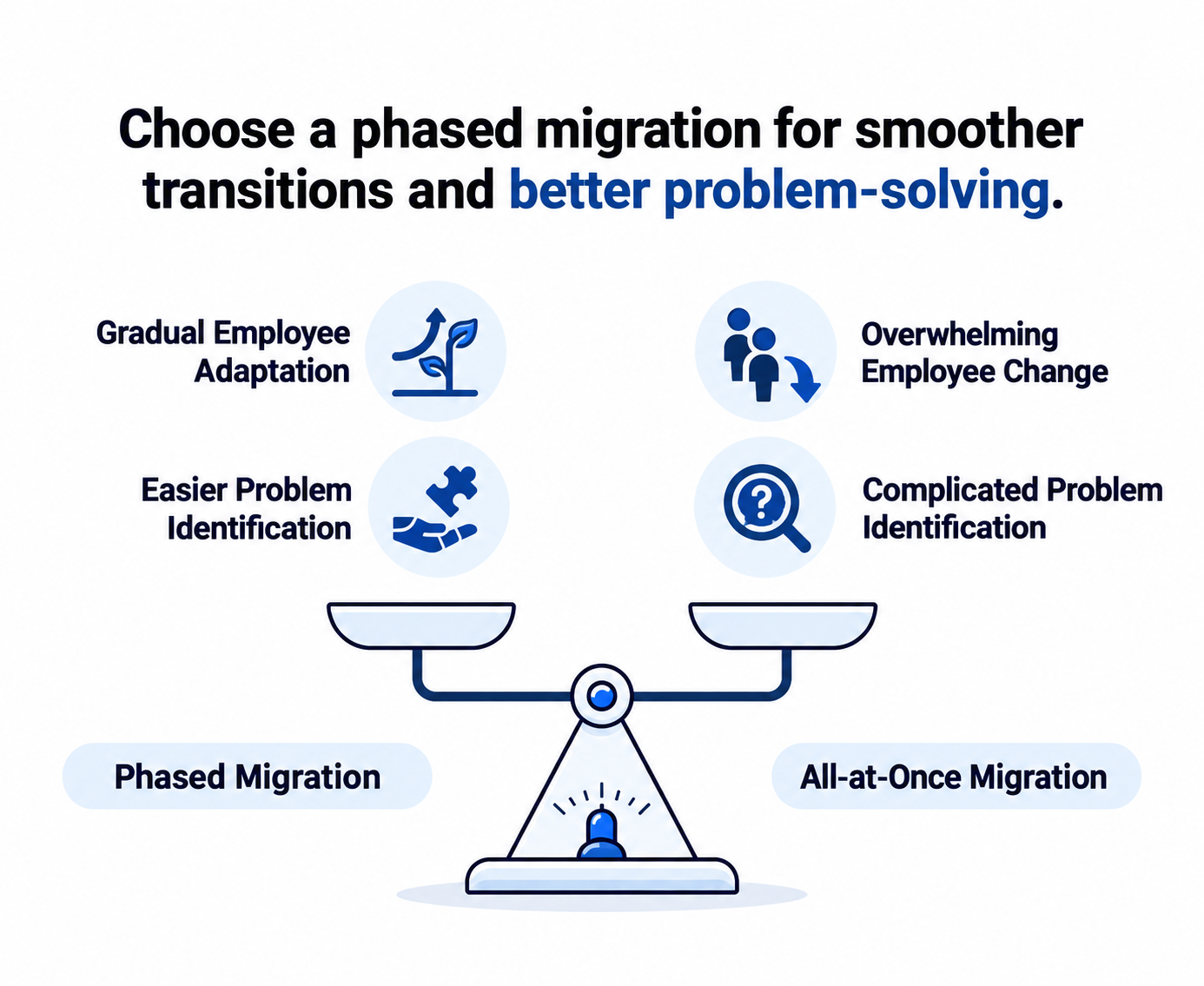
You don't need to make a radical overhaul of your business. A phased migration may be easier to deal with. The first step is to pinpoint sources of conflict. Maybe they have not realized how hard it is to sell and follow up on customers. In some instances, inventory might never match what you'd like. Perhaps too much time is spent reconciling information from various files.
Those areas become the “start” points.
You can add many other Odoo applications after the main workflow is well established.
The latter also provides employees leisure time to become accustomed to the new system without the feeling that all the familiar processes have vanished overnight.
But there is another upside, too: problems are more likely to be spotted.
When nothing is consistent, it is difficult to determine the cause of a problem. A staged rollout provides your team time to test, adjust, and improve.
What Happens To Your Existing Excel Data?
This is most likely the question you have at the back of your mind.
“What do we do with all of the data we already have?”
This depends on the information and the nature of your spreadsheets.
Databases of customers, product catalogues, inventory data, sales history, and other valuable business data can be created and moved to the proper Odoo environment. Not just importing everything is important. It ensures that the information is clean, mapped properly, and will be usable once it has been migrated.
Consider it to be the same as changing offices.
You wouldn't fill all the boxes with all the papers and all the boxes with all the broken printers and all the boxes and say, "this is a great move. You would determine what to move into the new office, label it correctly, and place it where it can be located.
Data migration needs to be done the same.
Odoo Erp Should Fit Your Business, Not Force Your Team To Fight The Software
It's important to choose an ERP system that can be integrated with your business, rather than you having to adapt to it.
All businesses are unique.
There are various needs of a manufacturer that vary from a retailer. Unlike a service company, a distributor keeps two types of stock: product and parts. The approval process, reporting, and customer journey between two businesses, even in the same industry, can be very different.
It's important, therefore, that the software is implemented correctly.
More complex requirements can require configuration, customization, and development on Odoo, which is a modular and flexible platform.
At this point, software development plays a crucial role in an ERP project.
In some cases, it's just a matter of configuration. Your business may require a custom workflow, integration, or functionality that is not available, but very close to what you need. Don't want to make everything that you can because it is the goal. It should fit the actual operation of your business.
Don't Forget The Systems You Already Use
Make sure not to overlook systems that you have already implemented
Switching to Odoo doesn't mean that your company has to give up any other platforms used.
Perhaps you already have an e-commerce shop, payments, messaging, or other business apps that are crucial to your daily business operations.
The bigger issue is typically the disconnect between them.
When employees need to move information from one platform to another and manually enter the information into the other platform, you have recreated the same problem you were trying to solve by leaving Excel.
Odoo can be connected with existing business platforms, allowing information to move between systems more efficiently. The integration of Odoo with the platforms that businesses are already using is part of Octoon's implementation process.
This is also one of the reasons it's beneficial to opt for an implementation team that's familiar with Odoo and has other software development experience. Not just about installing an ERP; it's about getting your larger technology environment to play nicely.
Your Team Matters More Than The Software
In the process of ERP implementation, there's one thing that's overlooked: a human aspect.
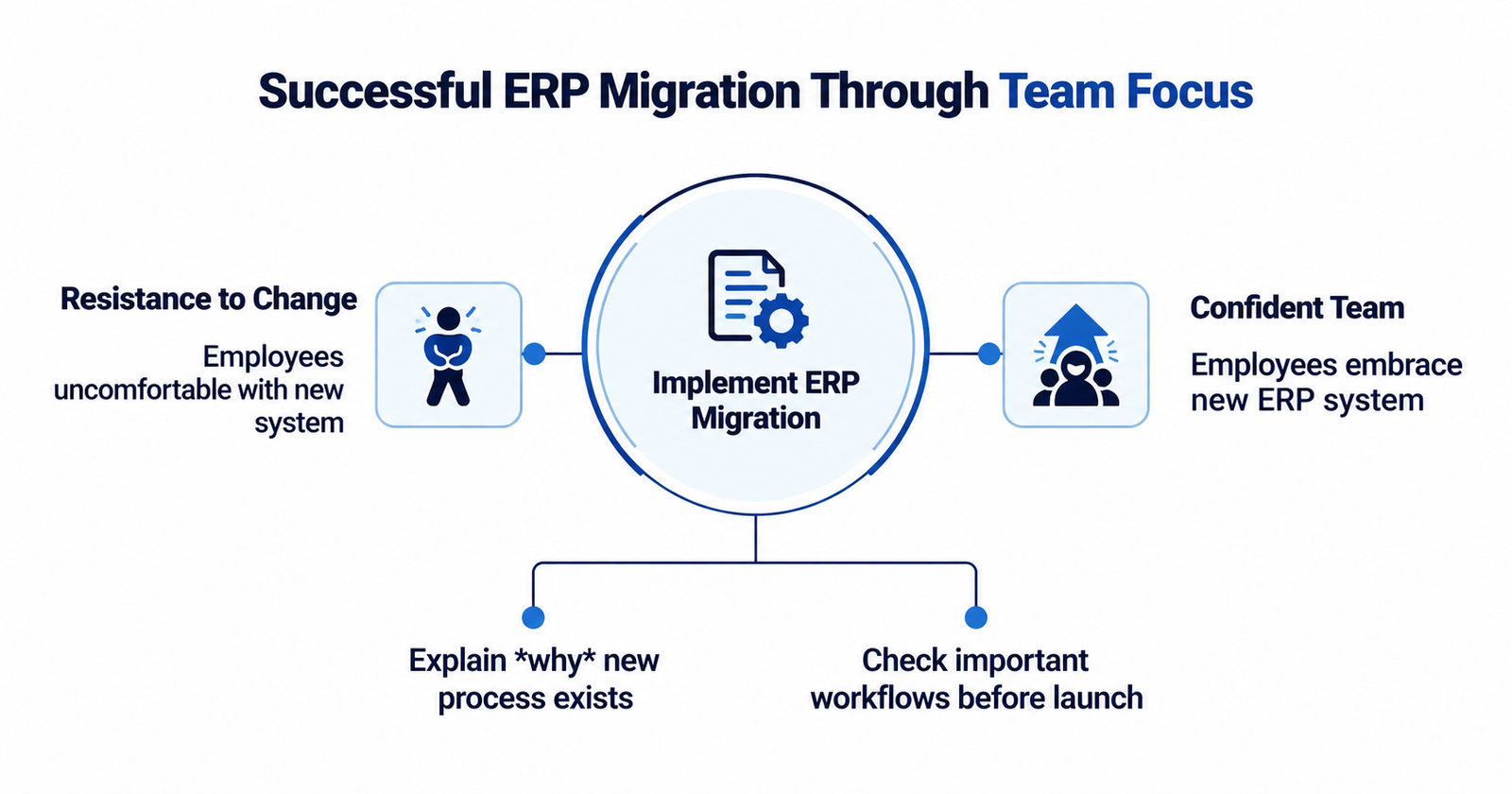
People become comfortable with familiar systems, even imperfect ones. Changes that involve handing over a spreadsheet that has been created and managed for years without proper information may also lead to resistance.
Training should thus be included in the migration, rather than as an afterthought.
It is important that employees understand the reason for the new process and how it will help them make their jobs easier.
Testing matters too.
Prior to going live, important workflows should be reviewed: sales; inventory movements; financial processes; approvals; reports; and any integrations that are critical to the business. The following is Octoon's prescribed process for implementing the system: discovery, planning, configuration, testing, launch, and continuous support.
That preparation gives your team something much more useful than a software installation: confidence.
Ready To Get Out Of The Spreadsheet Jungle?
If your business has reached the point where spreadsheets are slowing people down, you don't need to rip everything out and hope for the best.
In the implementation of Odoo, Octoon Technologies starts by understanding the business's workflow, then configures the required Odoo applications, imports the data, links other applications, and gives continuous support as per the changing business needs.
Octoon is an Odoo Official Partner and offers services for implementing Odoo, customizing it, and other technology-related services. It's about simple things: creating an Odoo environment that fits the business, rather than the business that fits into the software
Your Spreadsheets Don't Have To Disappear Overnight
You don't need to forget how to use your spreadsheets.
The objective of going to Odoo isn't to wipe everything your enterprise has created.
Years of customer knowledge, product information, transactions, and decisions are contained in your spreadsheets. The better course of action is to take the good bits and scrub away the not-so-great parts, and give the good parts a system in which they can work together.
So it should feel like a successful migration.
Not a "reset"...
Not months of turmoil.
It is only a small step from “Which spreadsheet contains the most up-to-date number?” to “Where do I need to take action?”
As soon as your team gets there, Odoo doesn't feel like yet another software anymore.
It suddenly seems like the place where the business makes sense.
Thinking About Moving to Odoo?
If Excel is becoming harder to manage, it may be time to look at what Odoo can do for your business. Octoon Tech can help you review your current setup, move the right data, and set up Odoo around the way your team actually works.
Talk to Octoon Tech about your Odoo implementation.
Frequently Asked Questions
1. How do I migrate from Excel to Odoo ERP without disrupting my business?
Start by reviewing and cleaning your existing data, then migrate the most important workflows in stages instead of changing everything at once. Test sales, inventory, finance, approvals, and integrations before going live. Octoon Tech can help you plan, migrate, test, and implement Odoo with minimal disruption.
2. Can existing Excel customer, product, and sales data be imported into Odoo?
Yes. Customer records, product information, inventory data, sales history, and other useful business data can be prepared and imported into Odoo. The key is to clean, organize, and map the data correctly before migration so your new system starts with accurate information.
3. Which Odoo ERP modules should a business implement first when replacing Excel?
It depends on where your current spreadsheets create the most problems. Businesses can start with areas such as CRM, Sales, Inventory, or Accounting, then introduce additional Odoo applications as their core workflows become stable.
4. Do I need Odoo customization, or can standard Odoo replace Excel workflows?
Standard Odoo can handle many common business processes, so customization is not always necessary. If your business has specific workflows, integrations, or functionality that standard Odoo cannot support, customization or development may be useful. Octoon Tech can help determine whether configuration, customization, or integration is the right approach for your business.