
Custom Real Estate CRM Development for Property Professionals
Introduction
Working in real estate means handling many things at once, talking to new clients, showing houses, keeping records, and following up on deals. When all this information stays in different places, mistakes start to happen. An agent might forget to call a client, lose a contact number, or miss an important update. This doesn’t mean the agent is careless; it simply shows how hard it is to manage everything without a proper system.
To make this easier, some real estate businesses now build their own systems through custom real estate CRM software development. It means creating a simple tool made exactly for how they work every day. This kind of software helps keep all client and property details in one place, reminds agents of tasks, and makes daily work clear and organized. In this guide, we’ll learn what this system is, how it works, and why it helps real estate professionals do their job better.
What Is Custom Real Estate CRM Software Development?
Custom real estate CRM software development means creating a system that is built especially for people who work in property. Instead of using a common app made for every kind of business, a custom CRM is made to match how real estate professionals actually work each day.
It helps keep everything connected to clients, properties, payments, and follow-ups inside one simple platform. For example, an agent can easily see which clients are interested in which properties, when to call them again, and what stage each deal is at. It removes the need to use many separate tools or notes.
A real estate company, a broker, or even a builder can have their own version of this system. The features can be completely different depending on what they need. An agency might want to track property listings and meetings, while a builder might want to manage project sites and payment progress. That is the main idea behind custom CRM software development, you only include the tools that truly help your work.
Why Ready-Made CRMs Often Don’t Work for Real Estate
Many agents start by using normal CRM software made for all businesses. But soon they realize it doesn’t fit real estate needs. Property work is different from other fields; it involves people, land, legal papers, and deals that take weeks or months to close. Most general CRMs are too simple for that.
Here’s why they usually fail to work well for real estate:
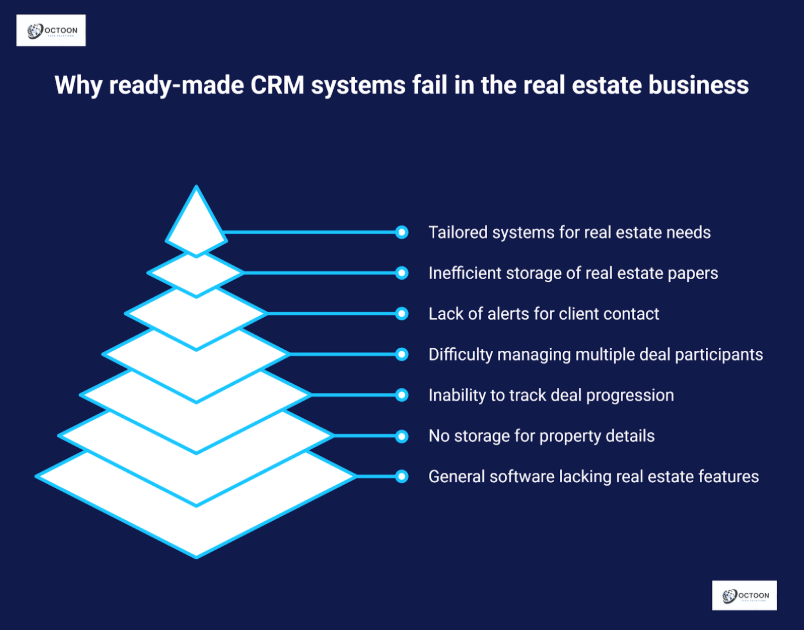
- No space for property listings: Common CRMs don’t let you store property images, prices, or details like size and location.
- Missing deal stages: Real estate deals move step by step from inquiry to visit, to booking, to closing. Ready-made CRMs can’t track these stages clearly.
- Difficult agent or broker tracking: In property business, one deal can have many people involved. Most CRMs can’t show who is doing what.
- Weak follow-up reminders: Without alerts or reminders, agents forget to contact clients at the right time.
- Poor document management: Real estate has many papers agreements, receipts, ID copies which are hard to store in normal CRMs.
Because of these issues, real estate companies now prefer systems built through reliable business tech solution services. These systems are made to connect all parts of their daily work clients, listings, and deals in one simple place. It helps them work smarter, not harder, and keeps their business more stable and well-managed over time.
Key Features of a Custom Real Estate CRM
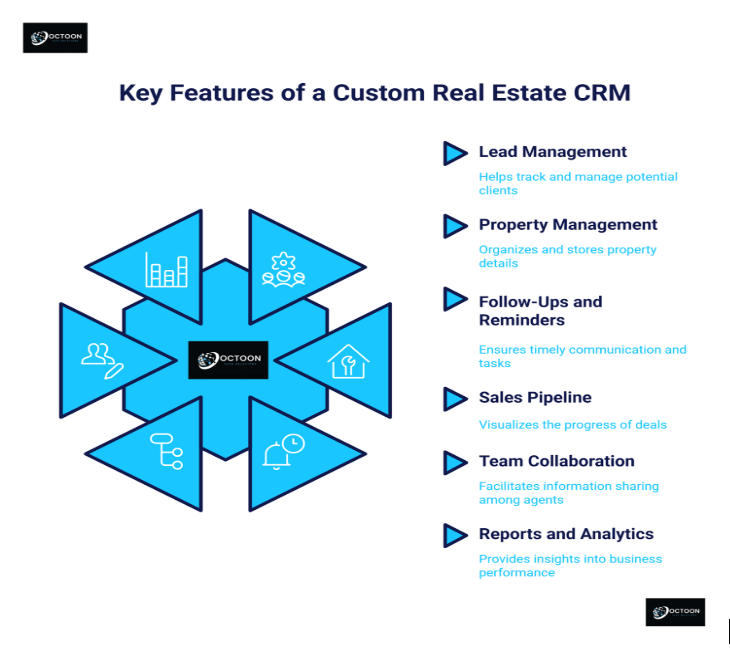
A good CRM made for real estate helps you stay organized and manage work without stress. It keeps all your important details in one safe place and reminds you what to do next. Below are the main features that make it useful for property professionals.
1. Lead Management
Every sale starts with a lead, a person who wants to buy or sell property. With this feature, you can record every new contact easily. You can see who they are, what kind of property they want, and when you last talked to them. A real estate lead management CRM makes it simple to follow each lead step by step, so you don’t lose track or forget anyone.
2. Property Management
This feature helps you keep all property information together. You can save photos, prices, sizes, and locations in one place. When a client calls, you can quickly open the details and answer right away. It saves time and avoids confusion.
3. Follow-Ups and Reminders
It’s easy to forget a call or meeting when you’re busy. The CRM sends small reminders to help you stay on time. You can set follow-up dates, visit times, and payment alerts. This keeps your work smooth and helps you stay professional with clients.
4. Sales Pipeline
The sales pipeline shows where each deal is at the moment. You can see which clients are just asking questions and which ones are ready to buy. This helps you focus on the right people and close deals faster.
5. Team Collaboration
When many agents work together, updates can get lost. This feature lets everyone see the same information. If one agent adds a new client or updates a deal, the rest of the team can see it instantly. It keeps teamwork simple and clear.
6. Reports and Analytics
Reports help you understand your progress. You can see how many leads turned into sales, which properties sold faster, and what needs improvement. These simple numbers help you make better choices for your business in the future.
Steps Involved in Developing a Custom Real Estate CRM
Building a custom real estate CRM is like creating a tool that matches exactly how your property business works. Every real estate team has its own way of handling leads, clients, and property listings. A ready-made tool can’t always fit those needs so a custom CRM is built step by step, carefully designed for your workflow.
Here’s how the process usually goes:
1. Understand Business Needs
The first step is to understand what you actually need from the CRM.
For example, do you want it to store property details, track client calls, or send reminders for follow-ups?
The development team talks with your agents and managers to learn what tasks take the most time and what problems they face daily.
When the real needs are clear, it becomes easier to build a system that truly helps instead of adding extra work.
2. Plan the Structure
Once the goals are clear, the team starts planning how the system will work.
This step is like sketching a house before construction. You decide where each room (or feature) will go.
Here, the focus is on listing out the main features, setting user roles, and planning how data will move between agents, clients, and admin.
Good planning makes sure the CRM stays simple to use even when your business grows.
3. Design the Interface
Now it’s time to make the CRM easy to use.
The design should be perfect, with everything in its right place: leads, listings, messages, and reports.
Real estate agents are often busy and on the move, so the design should help them find what they need in just a few clicks.
The idea is to make a dashboard that feels friendly, not something that needs hours of training.
4. Develop and Test the CRM
Once the design is ready, developers start turning it into a working system.
They build each feature one by one lead tracking, property listings, email alerts, and reports.
After that, everything is tested carefully to make sure it works fast and without errors.
This is also when special tools like a property tracking CRM are added. It helps agents keep an eye on every property, update its status, and check client interest all in one place.
5. Launch and Train the Team
After the CRM is tested, it’s launched for your team to use.
But before everyone starts, training sessions are held so agents can learn how to use it easily.
They practice adding leads, tracking sales, and managing listings inside the new system.
Once everyone is comfortable, the CRM becomes part of their everyday routine helping them save time, stay organized, and close deals faster.
Benefits of Custom Real Estate CRM Development for Agencies
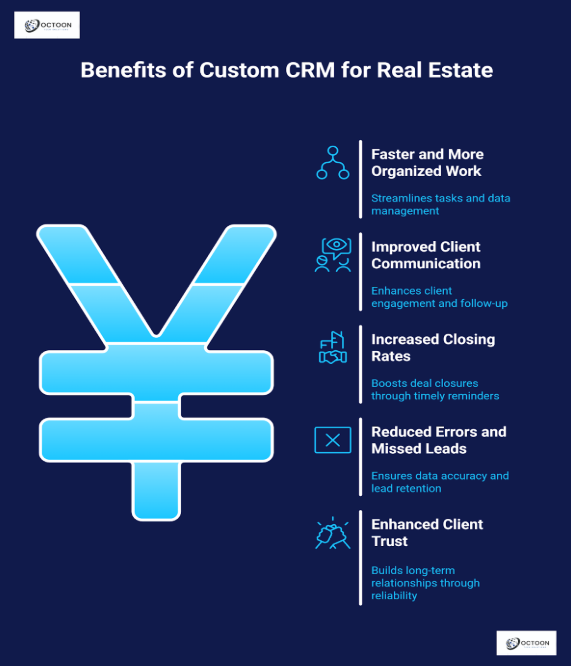
A custom CRM is made to fit the way your agency really works. It removes extra steps, saves time, and helps your team focus on clients instead of paperwork. Below are some clear benefits that show why agencies prefer custom CRM development.
1. Works exactly the way your business works
Every real estate agency has its own way of handling clients and listings. A custom CRM follows your daily process instead of forcing you to change it. You decide what features you need and how they should work. It becomes a tool built around your habits, not the other way around.
2. Grows with your company
As your agency adds more agents, listings, or projects, the CRM can grow too. You can add new features or modules any time you need. This means your system never becomes outdated, it grows with you step by step.
3. Connects easily with other tools
A custom CRM can link with your email, website, and property listing portals. This connection saves time and avoids double work. For example, when a new lead fills a form on your website, it can appear directly inside the CRM. This type of setup also supports real estate workflow automation, helping your daily tasks run smoothly without constant manual input.
4. Offers better data privacy and security
When you use your own system, you decide how data is stored and who can see it. No outside company controls your client information. This keeps your business data private and safe from misuse.
5. Gives full control to your agency
With a custom CRM, you’re not limited by monthly plans or third-party rules. You own the system completely. You can change layouts, add new tools, or set your own limits whenever you want. This freedom helps your team work with confidence and flexibility.
Do you want to know how a custom CRM can make your real estate work easier?
At Octoon Technologies, we help real estate businesses build systems that truly fit their daily work. Our team creates simple tools that make it easier to manage clients, properties, and deals all in one place. If you want to understand how a custom CRM can improve your work, you can book a free consultation with us. We’ll listen to your needs, explain things, and guide you on how technology can make your real estate process faster and more organized.
Conclusion
In real estate, success depends on how well you manage people and information. Every call, visit, and deal needs proper attention. A custom CRM helps keep all this work simple. It puts your data, client details, and property records in one clear place where nothing is lost or mixed up. It makes daily work easier to handle and gives agents more time to focus on their clients.
Many real estate teams are now understanding the value of technology that fits their own process. Through custom real estate CRM software development, agencies can create systems that match their daily work and make operations easier to manage. It’s not about buying a tool, it's about building a clear, reliable way to organize your business and serve every client with care and accuracy.
Frequently Asked Questions
1: Why should a real estate agency build its own CRM instead of using a ready-made one?
A ready-made CRM is made for general business use, not for real estate. It usually misses features like property listings, deal stages, or broker tracking. When you build your own CRM, you can choose every feature that matches how your team actually works. It becomes a tool made for your process, not one you have to adjust to. This makes daily work easier, faster, and more accurate.
2: How does a custom CRM help agents manage clients better?
A custom CRM keeps all client details, property information, and follow-ups in one place. It reminds agents when to call, send updates, or schedule visits. This means no missed calls, no lost numbers, and better communication with every client. When clients see that their agent remembers their needs and responds on time, it builds trust and helps create stronger, long-term relationships.
3: Is custom real estate CRM software development expensive or difficult to maintain?
It depends on what features you need, but in most cases, it’s a smart investment. You don’t pay monthly fees or depend on outside companies. You own the system completely, and it grows with your business. Once built, a good CRM is easy to use and manage, even for small teams. In the long run, it saves both time and money by keeping everything organized and reducing mistakes.